Step 1: Navigate to the Timeshare Marketplace
Visit the Timeshare Users Group Online Marketplace
All For Sale, For Rent, For Exchange, and Want to buy/rent listings are placed here!
Step 2: Log in and click "Post new Listing"
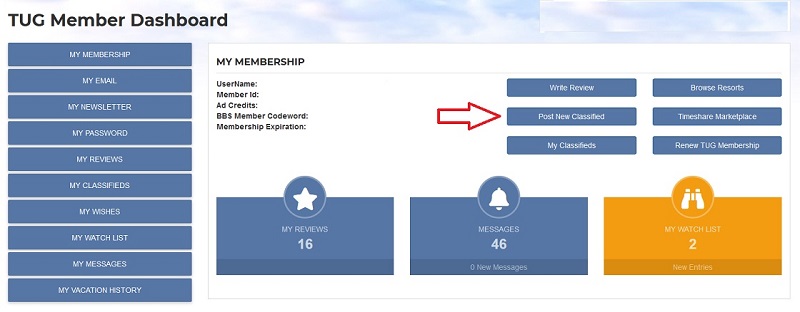
As you see highlighted by the red arrorw, the Post New Classified link is only available if you are logged in as a TUG member. Also note the difference between the CLASSIFIED ADs (want to sell, want to rent your own timeshare) and the WISH ADs (want to buy, want to rent someone else's timeshare) and ensure you are posting the correct ad type!
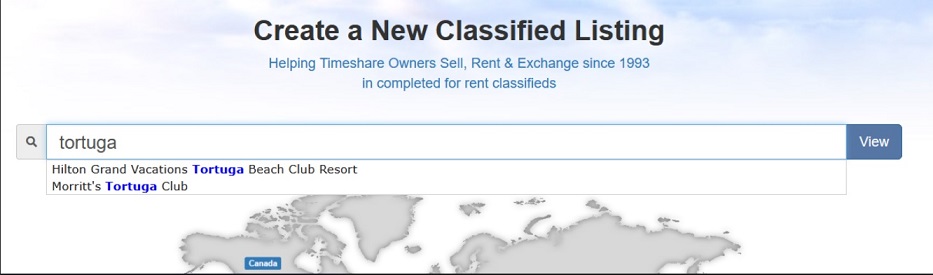
Step 3: Choose the Timeshare Resort or Point System
Here you will search for and choose the resort or point system you wish to post a listing for! This is what you currently own and are looking to post for sale, rent or exchnage in the TUG marketplace
Simply type the name of the resort or a single unique word contained in the resort name to populate the search window and then select your choice!
Step 4: Enter the details of your marketplace listing
Enter or select the appropriate information in these boxes in order to accurately identify what you are lising for Sale (or rent or exchange). Also be sure to type in a descriptive title and description for your ad to attract buyers browsing the marketplace! Once you are satisfied the information is correct, click SUBMIT LISTING at the bottom of the page.
*note if you have chosen a points listing, you can choose to select your home resort here as well if applicable.
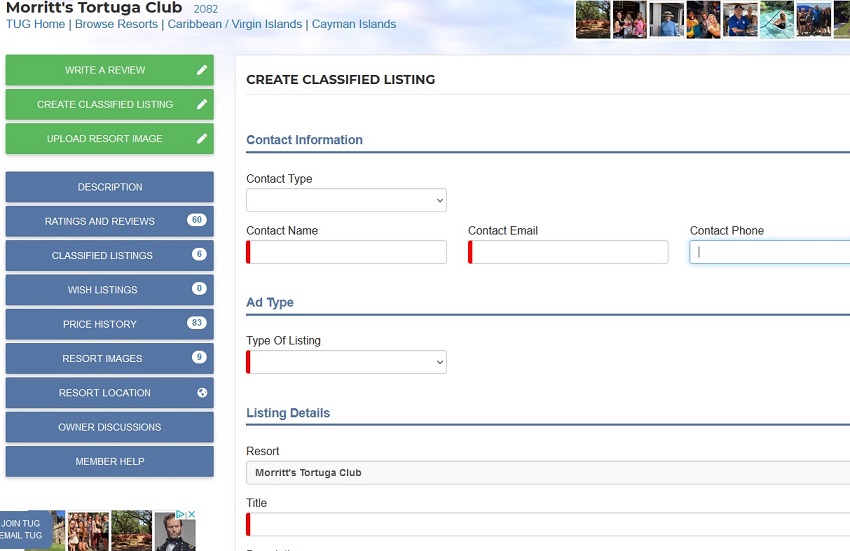
Admin Note: To submit your listing you MUST click the box and agree to the TUG Marketplace Warnings/Terms/Conditions displayed at the bottom. Only after checking this box to agree with the button to "Save Classified Listing" appear!
Step 5: Review your Listing
Once you click the bottom to save your listing you will see either an instant on screen SUCCESS! confirmation message, or an error that indicates a missing or misconfigured field to correct above!
After successfully submitting your listing you can choose to submit another listing at the same resort, or return to your dashboard to view your listing as well as all ads you have submitted on TUG in the past. As you see the status of this ad is PENDING, as all ads go into an approval queue and will be published within 24 hours. Nothing more is required of you to get your ad posted, we take care of the rest! You can come back here at any time to edit your ad to make any changes you wish!
Step 6: Be sure to check for and respond to Messages!
One of our biggest complaints is individuals not responding to ad messages. It is very important to check back regularly to view your messages as many times our "notification" email will get trapped in spam filters or junk email folders and go unnoticed. This is the very reason we keep the original messages stored on TUG with your ad (it wont ever be deleted unless you click delete) and will remain there forever as a record!
Also be sure to mark your ads as sold or rented as applicable to ensure the accuracy of ads in the Marketplace! Note that ads by default will expire 90 days after posting if they are not renewed! You will get an email notification that your ad is about to expire within the next 10 days, and after logging back in you will see a new link allowing you to "extend your ad" an additional 90 days!
We hope this article helps you with posting ads in the TUG Timeshare Marketplace! Go post your ad today! and thus can easily determine if the other party is a scammer! Place a Timeshare Classified Listing today!
Note we also have a video of this exact process available here (video updated for 2024!):
 Access to Ratings & Reviews of more than 5000 Timeshare resorts all over the world!
 The TUGBBS online community forums consists of tens of thousands other timeshare owners and is the first, largest and most informative online Timeshare Forum on the internet!
 The TUG Timeshare Marketplace is one of the largest and most visited timeshare classified ad sites on the internet with Millions of dollars in completed listings and thousands of current ads posted by owners!
 TUG Advice is probably the most helpful section of the site for new buyers/sellers just getting into timesharing.